Lesson Objective
By the end of this lesson, you will understand the different types of errors in Python, know how to use try-except blocks to handle exceptions gracefully, and have strategies for debugging when things go wrong. Error handling is essential for creating robust programs.
What You Will Learn
- The difference between syntax errors and runtime errors
- Common exception types and their causes
- How to use try-except blocks
- How to catch specific exception types
- Using else and finally clauses
- Debugging strategies and techniques
Required Knowledge or Tools
This lesson builds on all previous lessons. You should have experience writing programs that sometimes produce errors. Understanding functions and data structures will help you appreciate common error scenarios.
Concept Explanation
Python distinguishes between syntax errors and exceptions. Syntax errors occur when code violates Python's grammar rules and are detected before the program runs. Exceptions occur during execution when something goes wrong, such as dividing by zero or accessing a missing key.
The try-except block lets you anticipate and handle exceptions. Code that might cause an exception goes in the try block. If an exception occurs, Python jumps to the except block instead of crashing. You can catch specific exception types or handle all exceptions generally.
Debugging is the process of finding and fixing errors. Strategies include reading error messages carefully, adding print statements to see variable values, testing small pieces of code in isolation, and using a systematic approach to narrow down the problem location.
Why This Lesson Matters
Real-world programs must handle unexpected situations gracefully. Users enter invalid input, files are missing, network connections fail. Without error handling, these situations crash your program. With proper error handling, your program can recover, provide helpful messages, and continue operating.
Step-by-Step Guide
Step 1: Understanding Exceptions
Create a file called errors.py and observe common errors:
numbers = [1, 2, 3]

try:
    print(numbers[10])
except IndexError:
    print("Index out of range!")
Step 2: Basic Try-Except
Handle potential errors:
def divide(a, b):
    try:
        result = a / b
        return result
    except ZeroDivisionError:
        print("Cannot divide by zero!")
        return None

print(divide(10, 2))
print(divide(10, 0))
Step 3: Multiple Exception Types
Handle different errors differently:
def get_value(data, key):
    try:
        return data[key]
    except KeyError:
        print("Key not found")
    except TypeError:
        print("Invalid data type")

person = {"name": "Alice"}
print(get_value(person, "name"))
print(get_value(person, "age"))
Step 4: Try-Except-Else-Finally
Use all clauses:
try:
    number = int("42")
except ValueError:
    print("Invalid number")
else:
    print("Conversion successful:", number)
finally:
    print("This always runs")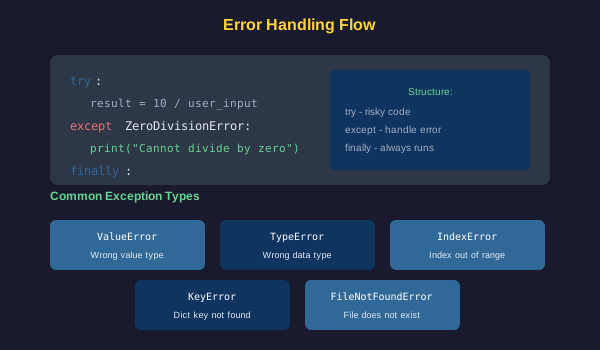
Common Mistakes
- Catching all exceptions without knowing what went wrong
- Ignoring exceptions silently instead of logging or handling them
- Putting too much code in try blocks, obscuring the actual risk
- Not reading error messages carefully, which contain useful information
- Making assumptions about the cause instead of investigating
Practical Example or Scenario
Create a safe user input function:
def get_number(prompt):
    while True:
        user_input = input(prompt)
        try:
            number = float(user_input)
            return number
        except ValueError:
            print("Please enter a valid number.")

age = get_number("Enter your age: ")
print("You are " + str(int(age)) + " years old.")
This function keeps asking until the user provides valid input, demonstrating practical error handling.
Lesson Summary
In this lesson, you learned the difference between syntax errors and exceptions. Try-except blocks let you handle exceptions gracefully. You can catch specific exception types for targeted handling. The else clause runs when no exception occurs, and finally always runs for cleanup. Good debugging involves reading errors carefully and testing systematically. In the final lesson, you will build a complete project.