Lesson Objective
By the end of this lesson, you will understand how to use dictionaries to store data as key-value pairs. You will be able to create dictionaries, access and modify values, iterate over dictionary contents, and recognize when dictionaries are more appropriate than lists.
What You Will Learn
- How to create dictionaries with key-value pairs
- How to access values using keys
- How to add, modify, and remove entries
- How to iterate over keys, values, and items
- Common dictionary methods
- When to use dictionaries versus lists
Required Knowledge or Tools
This lesson builds on lists from Lesson 08 and loops from Lesson 07. Understanding the difference between accessing data by index versus by key is central to this lesson.
Concept Explanation
A dictionary stores data as key-value pairs. Unlike lists where you access items by their numeric index, dictionaries let you access values using meaningful keys. Keys are typically strings but can be any immutable type. Values can be any type.
Dictionaries are created using curly braces with key-value pairs separated by colons. Each pair is separated by commas. You access values by placing the key in square brackets after the dictionary name.
Dictionaries are mutable, so you can add new key-value pairs, change existing values, and remove entries. They are extremely efficient for looking up values by key, making them ideal for storing structured data.
Why This Lesson Matters
Dictionaries are essential for representing real-world data structures. A person's information naturally fits as a dictionary with keys like name, age, and email. Configuration settings, database records, and API responses commonly use dictionary-like structures. Understanding dictionaries opens the door to working with complex data.
Step-by-Step Guide
Step 1: Creating Dictionaries
Create a file called dictionaries.py:
person = {
    "name": "Alice",
    "age": 30,
    "city": "New York"
}

print(person)
Step 2: Accessing Values
Retrieve values by key:
print(person["name"])
print(person["age"])

name = person.get("name")
country = person.get("country", "Unknown")
print(name, country)
Step 3: Modifying Dictionaries
Add and update entries:
person["email"] = "[email protected]"
person["age"] = 31

del person["city"]

print(person)
Step 4: Iterating
Loop through dictionary contents:
for key in person:
    print(key + ":", person[key])

for key, value in person.items():
    print(key, "=", value)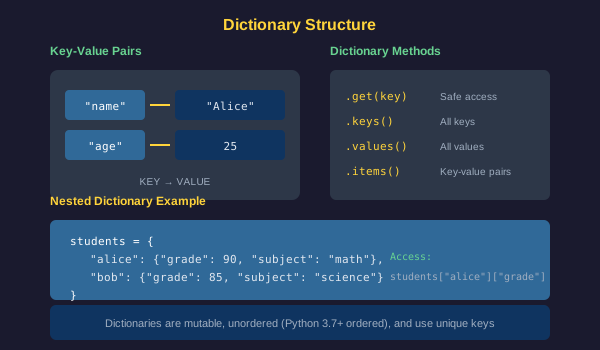
Common Mistakes
- Using a key that does not exist without get, causing a KeyError
- Using mutable types like lists as dictionary keys
- Forgetting that dictionary keys must be unique
- Confusing dictionary syntax braces with set braces
- Trying to access dictionary values by numeric index
Practical Example or Scenario
Create a simple contact book:
contacts = {
    "Alice": "555-1234",
    "Bob": "555-5678",
    "Charlie": "555-9999"
}

contacts["Diana"] = "555-0000"

print("Contact Book:")
for name, phone in contacts.items():
    print(name + ": " + phone)

search = "Bob"
if search in contacts:
    print(search + "'s number: " + contacts[search])
Lesson Summary
In this lesson, you learned that dictionaries store data as key-value pairs, accessed by meaningful keys rather than numeric indices. You can add, modify, and remove entries, and iterate over keys, values, or both. The get method safely retrieves values with a default fallback. Dictionaries are ideal for structured data. In the next lesson, you will learn about error handling and debugging.