Lesson Objective
By the end of this lesson, you will have built a complete, functional Python application that combines all the concepts from this course. You will experience the process of planning, implementing, and testing a real project, preparing you for independent Python development.
What You Will Learn
- How to plan a project before coding
- How to break a project into functions
- How to combine data structures effectively
- How to create an interactive user experience
- How to test and refine your code
- Next steps for continuing your learning
Required Knowledge or Tools
This lesson requires understanding of all previous lessons. You should be comfortable with variables, data types, control flow, loops, lists, dictionaries, functions, and error handling. This project brings everything together.
Concept Explanation
Building a complete project requires planning before coding. You need to understand what the program should do, what data it needs to manage, and how users will interact with it. Breaking the project into smaller functions makes the code manageable and testable.
A well-structured project uses functions for specific tasks, data structures to organize information, loops for menus and repeated actions, and error handling for robustness. Each piece works together to create a cohesive application.
Testing is essential. Try different inputs, including edge cases and invalid data. Fix bugs as you find them. Refine the user experience based on how the program feels to use.
Why This Lesson Matters
Building a complete project solidifies your learning by requiring you to apply concepts in context. It reveals gaps in understanding and builds confidence. Completing a project demonstrates that you can create functional software, which is the ultimate goal of learning to program.
Step-by-Step Guide
Project: Task Manager Application
We will build a simple task manager that lets users add, view, complete, and remove tasks. Create a file called task_manager.py:
Step 1: Data Structure
Define how to store tasks:
tasks = []

def add_task(description):
    task = {
        "description": description,
        "completed": False
    }
    tasks.append(task)
    print("Task added: " + description)
Step 2: View Tasks
Display all tasks with their status:
def view_tasks():
    if len(tasks) == 0:
        print("No tasks yet.")
        return

    print("\nYour Tasks:")
    print("-" * 30)
    for i in range(len(tasks)):
        task = tasks[i]
        status = "[X]" if task["completed"] else "[ ]"
        print(str(i + 1) + ". " + status + " " + task["description"])
    print("-" * 30)
Step 3: Complete and Remove
Mark tasks complete and remove them:
def complete_task(index):
    if index < 1 or index > len(tasks):
        print("Invalid task number.")
        return
    tasks[index - 1]["completed"] = True
    print("Task marked complete!")

def remove_task(index):
    if index < 1 or index > len(tasks):
        print("Invalid task number.")
        return
    removed = tasks.pop(index - 1)
    print("Removed: " + removed["description"])
Step 4: Main Menu
Create the interactive menu:
def show_menu():
    print("\n=== Task Manager ===")
    print("1. Add Task")
    print("2. View Tasks")
    print("3. Complete Task")
    print("4. Remove Task")
    print("5. Exit")

def main():
    while True:
        show_menu()
        choice = input("Choose an option: ")

        if choice == "1":
            desc = input("Enter task description: ")
            add_task(desc)
        elif choice == "2":
            view_tasks()
        elif choice == "3":
            view_tasks()
            try:
                num = int(input("Enter task number to complete: "))
                complete_task(num)
            except ValueError:
                print("Please enter a valid number.")
        elif choice == "4":
            view_tasks()
            try:
                num = int(input("Enter task number to remove: "))
                remove_task(num)
            except ValueError:
                print("Please enter a valid number.")
        elif choice == "5":
            print("Goodbye!")
            break
        else:
            print("Invalid option. Please try again.")

main()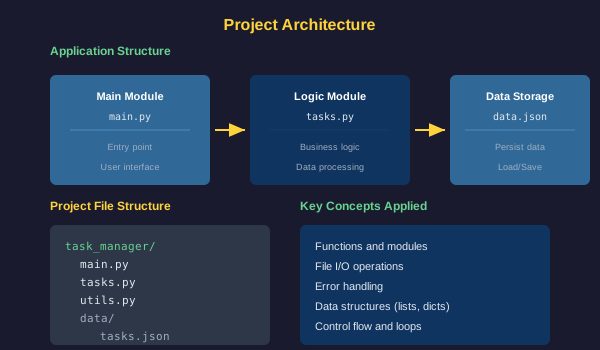
Common Mistakes
- Starting to code without a plan, leading to disorganized code
- Writing one large function instead of breaking into smaller ones
- Not handling invalid user input
- Forgetting off-by-one errors when converting between user numbers and indices
- Not testing thoroughly with different scenarios
Practical Example or Scenario
Run the complete program and test all features. Add several tasks, view them, mark some complete, remove others, and exit. Try entering invalid input to see how error handling works. Consider enhancements like saving tasks to a file or adding due dates.
Lesson Summary
Congratulations on completing this Python fundamentals course. In this final lesson, you built a complete application combining variables, data structures, functions, loops, conditionals, and error handling. You experienced the full development process from planning to testing. You are now equipped with foundational Python skills to continue learning advanced topics, explore frameworks, and build your own projects. The key to improving is practice. Keep coding, keep learning, and keep building.