Lesson Objective
By the end of this lesson, you will understand how to define and call functions in Python. You will be able to create functions that accept parameters, return values, and organize your code into reusable, modular components that make programs easier to write and maintain.
What You Will Learn
- How to define functions using the def keyword
- How to call functions and pass arguments
- The difference between parameters and arguments
- How to return values from functions
- Default parameter values
- Variable scope and local versus global variables
Required Knowledge or Tools
This lesson builds on all previous lessons. You should be comfortable with variables, data types, control structures, and loops. Functions combine these concepts into reusable units.
Concept Explanation
A function is a named block of code that performs a specific task. Functions help organize code by grouping related operations together. Once defined, a function can be called multiple times from different places in your program, avoiding code duplication.
Parameters are variables listed in the function definition that receive values when the function is called. Arguments are the actual values passed to the function. This distinction is important for understanding how data flows into functions.
Functions can return values using the return statement. When a function returns a value, you can use that value in expressions or store it in a variable. Functions without a return statement implicitly return None.
Why This Lesson Matters
Functions are fundamental to writing clean, maintainable code. They promote code reuse, reduce errors by centralizing logic, and make programs easier to understand by breaking complex operations into smaller, named pieces. Professional programmers write functions constantly.
Step-by-Step Guide
Step 1: Defining Functions
Create a file called functions.py:
def greet():
    print("Hello!")
    print("Welcome to Python")

greet()
greet()
Step 2: Parameters and Arguments
Accept input values:
def greet_person(name):
    print("Hello, " + name + "!")

greet_person("Alice")
greet_person("Bob")
Step 3: Return Values
Send results back to the caller:
def add(a, b):
    result = a + b
    return result

sum1 = add(5, 3)
sum2 = add(10, 20)

print("5 + 3 =", sum1)
print("10 + 20 =", sum2)
Step 4: Default Parameters
Provide optional values:
def greet(name, greeting="Hello"):
    print(greeting + ", " + name + "!")

greet("Alice")
greet("Bob", "Good morning")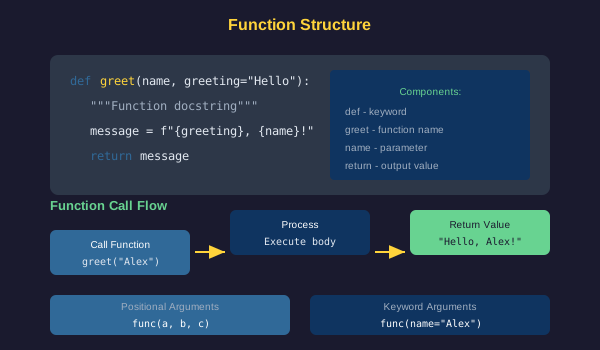
Common Mistakes
- Forgetting the colon at the end of the def line
- Calling a function before it is defined
- Forgetting parentheses when calling a function
- Passing the wrong number of arguments
- Forgetting to return a value when one is expected
- Confusing print with return
Practical Example or Scenario
Create a temperature converter with functions:
def celsius_to_fahrenheit(celsius):
    fahrenheit = (celsius * 9/5) + 32
    return fahrenheit

def fahrenheit_to_celsius(fahrenheit):
    celsius = (fahrenheit - 32) * 5/9
    return celsius

temp_c = 25
temp_f = celsius_to_fahrenheit(temp_c)
print(str(temp_c) + "C = " + str(temp_f) + "F")

temp_f = 77
temp_c = fahrenheit_to_celsius(temp_f)
print(str(temp_f) + "F = " + str(temp_c) + "C")
Lesson Summary
In this lesson, you learned that functions are reusable code blocks defined with def. Parameters receive values passed as arguments. The return statement sends values back to the caller. Default parameters make arguments optional. Functions are essential for organizing code and avoiding duplication. In the next lesson, you will learn about dictionaries for key-value data storage.