Lesson Objective
By the end of this lesson, you will understand how to create and use lists to store multiple values. You will be able to access, modify, and iterate over list elements, and use common list methods to manipulate collections of data effectively.
What You Will Learn
- How to create lists and access elements by index
- How to modify list contents
- Common list methods like append, remove, and sort
- How to iterate over lists with loops
- List slicing for extracting sublists
- Checking if items exist in a list
Required Knowledge or Tools
This lesson builds on loops from Lesson 07 and indexing concepts from Lesson 05. You should be comfortable with for loops and understand zero-based indexing.
Concept Explanation
A list is an ordered collection of items. Unlike individual variables that store single values, lists can store multiple values in a single variable. Items in a list are enclosed in square brackets and separated by commas. Lists can contain items of any type, including a mix of different types.
Lists are mutable, meaning you can change their contents after creation. You can add items, remove items, and modify existing items. This flexibility makes lists extremely useful for managing collections of data that change over time.
Like strings, lists support indexing and slicing. You access individual elements using their index in square brackets. Negative indices count from the end. Slicing creates a new list containing a subset of elements.
Why This Lesson Matters
Lists are one of the most commonly used data structures in programming. They allow you to work with groups of related items as a single unit. Whether you are processing a list of names, storing test scores, or managing any collection of data, lists provide the functionality you need.
Step-by-Step Guide
Step 1: Creating Lists
Create a file called lists.py:
fruits = ["apple", "banana", "cherry"]
numbers = [1, 2, 3, 4, 5]
mixed = ["text", 42, 3.14, True]

print(fruits)
print(numbers)
print(mixed)
Step 2: Accessing and Modifying
Work with individual elements:
colors = ["red", "green", "blue"]

print(colors[0])
print(colors[-1])

colors[1] = "yellow"
print(colors)
Step 3: List Methods
Use methods to manipulate lists:
items = ["a", "b", "c"]

items.append("d")
print(items)

items.insert(1, "x")
print(items)

items.remove("a")
print(items)

print(len(items))
Step 4: Iterating Over Lists
Process each item with a loop:
scores = [85, 92, 78, 90, 88]
total = 0

for score in scores:
    total = total + score

average = total / len(scores)
print("Average:", average)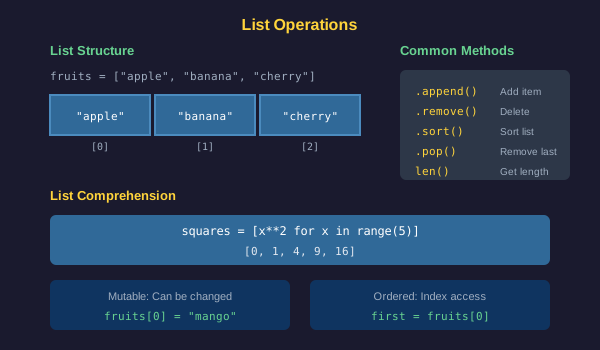
Common Mistakes
- Accessing an index that does not exist, causing an IndexError
- Forgetting that list indices start at 0
- Modifying a list while iterating over it, which can skip elements
- Confusing append, which adds one item, with extend, which adds multiple
- Using the wrong brackets, parentheses instead of square brackets
Practical Example or Scenario
Create a simple shopping list manager:
shopping = ["milk", "bread", "eggs"]

shopping.append("butter")
shopping.append("cheese")

print("Shopping List:")
for i in range(len(shopping)):
    print(str(i + 1) + ". " + shopping[i])

if "milk" in shopping:
    print("Remember to buy milk!")
Lesson Summary
In this lesson, you learned that lists store multiple values in an ordered collection. You can access elements by index, modify contents, and use methods like append and remove. Lists work seamlessly with loops for processing collections. The in operator checks membership. These capabilities make lists essential for managing groups of related data. In the next lesson, you will learn about functions to create reusable code.