Lesson Objective
By the end of this lesson, you will understand how to use loops to repeat actions in Python. You will master both for loops and while loops, know when to use each type, and be able to control loop execution with break and continue statements.
What You Will Learn
- The purpose and structure of for loops
- How to use the range function for counting
- How to iterate over strings and other sequences
- The purpose and structure of while loops
- How to use break to exit loops early
- How to use continue to skip iterations
Required Knowledge or Tools
This lesson builds on Lesson 06. You should understand conditionals because loops often use conditional logic. Familiarity with strings from Lesson 05 will help with iteration examples.
Concept Explanation
Loops allow you to execute a block of code multiple times. This is essential when you need to process many items, repeat an action a certain number of times, or continue an action until a condition is met.
For loops iterate over a sequence of values. You provide the loop with a sequence, and it executes the code block once for each item. The range function generates sequences of numbers, making it useful for counting loops.
While loops repeat as long as a condition remains true. You must ensure the condition eventually becomes false, or the loop will run forever. While loops are useful when you do not know in advance how many iterations you need.
Why This Lesson Matters
Loops are fundamental to programming because they eliminate the need to write repetitive code. Instead of writing ten print statements to count from one to ten, you write one loop. Loops enable programs to process large amounts of data, perform calculations iteratively, and handle tasks that require repetition.
Step-by-Step Guide
Step 1: Basic For Loop
Create a file called loops.py:
for i in range(5):
    print("Count:", i)

print("Loop finished")
Step 2: Iterating Over Strings
Loop through each character:
word = "Python"

for letter in word:
    print(letter)
Step 3: While Loop
Repeat while a condition is true:
count = 0

while count < 5:
    print("Count is", count)
    count = count + 1
Step 4: Break and Continue
Control loop execution:
for i in range(10):
    if i == 3:
        continue
    if i == 7:
        break
    print(i)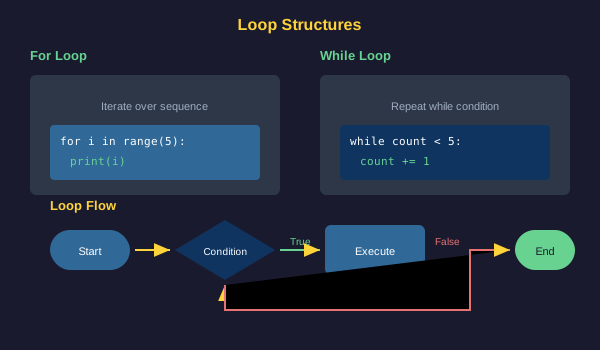
Common Mistakes
- Creating infinite while loops by forgetting to update the condition variable
- Off-by-one errors when using range, forgetting it excludes the end value
- Modifying a sequence while iterating over it, causing unexpected behavior
- Incorrect indentation causing statements to be inside or outside the loop unintentionally
- Using break or continue outside of a loop, which causes an error
Practical Example or Scenario
Calculate the sum of numbers from 1 to 100:
total = 0

for number in range(1, 101):
    total = total + number

print("Sum of 1 to 100:", total)
This demonstrates how loops can perform calculations that would be tedious to write out manually.
Lesson Summary
In this lesson, you learned that loops enable code repetition. For loops iterate over sequences and are ideal when you know how many iterations you need. While loops repeat while a condition is true and are useful for indefinite iteration. Break exits loops early, and continue skips to the next iteration. These tools give you powerful control over repetitive tasks. In the next lesson, you will learn about lists and collections.