Lesson Objective
By the end of this lesson, you will understand how strings work in Python, know how to access individual characters and substrings, and be able to use common string methods to manipulate text. String handling is essential because most programs work with text data in some form.
What You Will Learn
- How to create strings using different quote styles
- How to access characters using indexing
- How to extract substrings using slicing
- Common string methods for manipulation
- How to format strings with variables
- Working with user input as strings
Required Knowledge or Tools
This lesson assumes you understand variables and basic data types from Lesson 03. You should be comfortable printing output and assigning values to variables.
Concept Explanation
Strings in Python are sequences of characters. Each character in a string has a position called an index. Python uses zero-based indexing, meaning the first character is at index 0, the second at index 1, and so on. You can also use negative indices, where -1 refers to the last character, -2 to the second-to-last, and so forth.
Slicing allows you to extract a portion of a string by specifying a start index, an end index, and optionally a step. The slice includes characters from the start index up to but not including the end index. This syntax is very flexible and powerful for text processing.
Python strings are immutable, meaning once created, they cannot be changed. When you use string methods that appear to modify a string, they actually create and return a new string. The original string remains unchanged unless you assign the result back to the variable.
Why This Lesson Matters
Text processing is fundamental to programming. Nearly every program deals with text in some way, whether reading user input, processing files, displaying messages, or handling data. Understanding strings enables you to work with names, addresses, messages, file contents, and countless other forms of textual information.
Step-by-Step Guide
Step 1: Creating Strings
Strings can be created with single or double quotes:
message1 = "Hello, World!"
message2 = 'Python is fun'
long_text = """This is a
multi-line string."""

print(message1)
print(message2)
print(long_text)
Step 2: Indexing and Slicing
Access individual characters and substrings:
text = "Python"
print(text[0])
print(text[-1])
print(text[0:3])
print(text[2:])
Step 3: String Methods
Use built-in methods to manipulate text:
name = "  alice smith  "
print(name.upper())
print(name.lower())
print(name.strip())
print(name.title())
print(name.replace("alice", "bob"))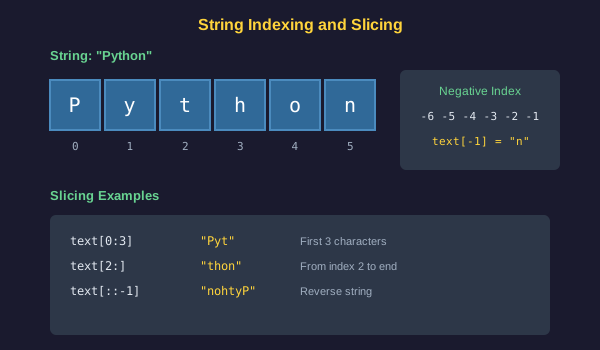
Common Mistakes
- Trying to access an index that does not exist, causing an IndexError
- Forgetting that indexing starts at 0, not 1
- Attempting to modify a string directly, forgetting that strings are immutable
- Mixing up the slice end index, which is exclusive not inclusive
- Forgetting that string methods return new strings and do not modify the original
Practical Example or Scenario
Create a program that formats a user profile:
first_name = "john"
last_name = "doe"
email = "[email protected]"

formatted_name = first_name.title() + " " + last_name.title()
formatted_email = email.lower()

print("Name: " + formatted_name)
print("Email: " + formatted_email)
print("Initials: " + first_name[0].upper() + last_name[0].upper())
Lesson Summary
In this lesson, you learned that strings are sequences of characters accessed by index. You practiced slicing to extract substrings and used methods like upper, lower, strip, and replace to transform text. You understand that strings are immutable and that methods return new strings. These text manipulation skills are essential for processing user input and working with data. In the next lesson, you will learn about control flow with conditional statements.