Lesson Objective
By the end of this lesson, you will understand how to create variables to store data, recognize the fundamental data types in Python, and apply naming conventions that make your code readable. Variables are essential building blocks that allow programs to remember and manipulate information.
What You Will Learn
- What variables are and how they work in Python
- How to create and assign values to variables
- The four fundamental data types: integers, floats, strings, and booleans
- Rules and conventions for naming variables
- How to check the type of a variable
- How to convert between different data types
Required Knowledge or Tools
This lesson assumes you have completed Lessons 01 and 02, can create Python files, and can run them from the command line. You should be comfortable using the print function to display output.
Concept Explanation
A variable is a named container that stores a value. Think of it as a labeled box where you can put information and retrieve it later using the label. In Python, you create a variable by choosing a name and using the equals sign to assign a value to it.
Python has several built-in data types. Integers are whole numbers without decimal points, like 42 or -7. Floats are numbers with decimal points, like 3.14 or -0.5. Strings are sequences of characters enclosed in quotation marks, representing text. Booleans represent truth values and can only be True or False.
Unlike some programming languages, Python does not require you to declare the type of a variable before using it. Python determines the type automatically based on the value you assign. This feature, called dynamic typing, makes Python more flexible and easier for beginners.
Why This Lesson Matters
Variables are fundamental to programming because they allow programs to store, manipulate, and retrieve data. Without variables, every piece of information would need to be typed out each time it is used, making programs inflexible and impractical. Understanding data types helps you use the right kind of data for each situation and avoid errors that occur when types are mixed incorrectly.
Step-by-Step Guide
Step 1: Creating Variables
Create a new file called variables.py and add the following code to create variables of different types:
name = "Alice"
age = 25
height = 5.6
is_student = True

print(name)
print(age)
print(height)
print(is_student)
Step 2: Checking Types
You can use the type function to see what type a variable is:
print(type(name))
print(type(age))
print(type(height))
print(type(is_student))
Step 3: Converting Types
Sometimes you need to convert between types. Use int(), float(), str(), and bool() functions:
number_string = "42"
number = int(number_string)
print(number + 10)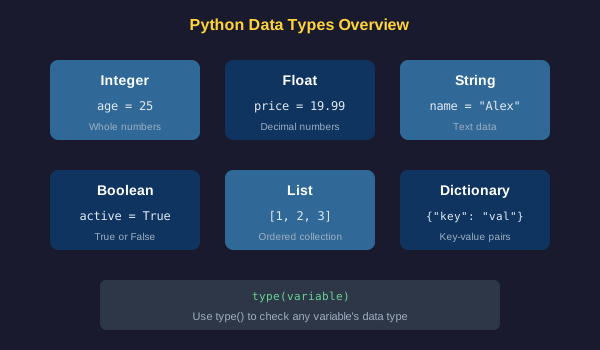
Common Mistakes
- Using spaces in variable names, which is not allowed in Python
- Starting variable names with numbers, which causes syntax errors
- Using Python reserved words like print, if, or for as variable names
- Forgetting quotation marks around strings, making Python interpret text as variable names
- Trying to perform arithmetic on strings without converting them to numbers first
Practical Example or Scenario
Create a program that stores information about a person and displays it formatted nicely:
first_name = "John"
last_name = "Smith"
birth_year = 1995
current_year = 2024

age = current_year - birth_year
full_name = first_name + " " + last_name

print("Name: " + full_name)
print("Age: " + str(age))
This example demonstrates variable assignment, arithmetic operations, string concatenation, and type conversion.
Lesson Summary
In this lesson, you learned that variables are named containers for storing data. You explored the four fundamental data types: integers for whole numbers, floats for decimals, strings for text, and booleans for true or false values. You practiced creating variables, checking their types, and converting between types. These concepts form the foundation for all data manipulation in Python. In the next lesson, you will learn more about working with numbers and mathematical operations.